Cash owed is a settlement amount, not your earnings. On a simple Toast closeout where card tips are paid from the drawer, cash sales minus card tips paid at close gives the amount owed to the restaurant. A negative result means you collect money. Payroll payouts, tip sharing, fees, and other adjustments can change the calculation.
Read your checkout in two passes
First work out what to turn in or collect. Then calculate the tips you keep. Mixing those two steps can make a good shift look like a loss—or count the same tips twice.
The lines to check
| Line | What to check before using it |
|---|---|
| Cash sales / cash in hand | Customer payments for the restaurant. Keep these separate from cash tips. |
| Credit / non-cash tips | Are these being paid at close, through payroll, or redistributed through a pool? |
| Cash tips declared | Compare the declared number with your own record. A zero is not evidence of what happened at the tables. |
| Owed to restaurant / owed to you | Use the direction of payment, not just the presence of a minus sign. This settles cash, not total earnings. |
| Tip sharing / tips withheld | Check whether deductions are already included before subtracting them again. |
Toast's report settings documentation explains the configurable sections, including Tip Sharing and Tips Withheld. It also distinguishes card tips paid from the drawer from those paid through payroll. Your restaurant's setup determines what appears.
Why “owed to restaurant” can be negative
Use this simplified example only when card tips are paid at close and there are no other adjustments:
| Scenario | Cash sales held | Card tips paid at close | Cash sales − card tips | Settlement |
|---|---|---|---|---|
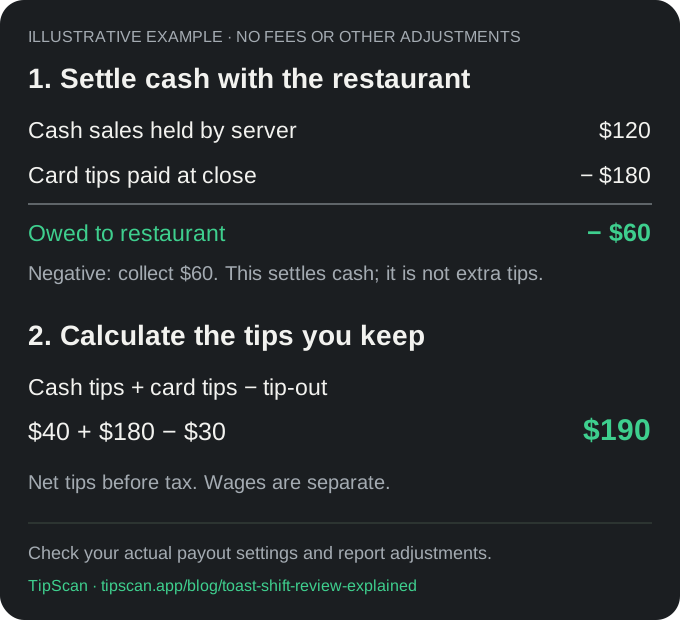
| More card tips than cash sales | $120 | $180 | −$60 | Collect $60 |
| More cash sales than card tips | $300 | $180 | $120 | Turn in $120 |
| Equal amounts | $180 | $180 | $0 | No net cash exchange |
In the first row, you already hold $120 from cash sales. Collecting another $60 brings the total to $180, covering the card tips owed to you. The $60 is part of getting your $180, not an extra $60 of tips.
If you also earned $40 in cash tips and paid $30 to coworkers, the tips you keep are $40 + $180 − $30 = $190 before taxes. Wages are separate. Use the tip-out calculator for multiple recipients, then the hourly wage calculator to include wages and hours.
What if my card tips arrive through payroll?
Do not subtract card tips from tonight's cash drop just because the simplified example does. Toast supports payroll payouts as well as drawer payouts. Follow your displayed reconciliation and confirm the payout arrangement with your manager. In your personal log, distinguish tips earned from cash received so a later payment is not counted as new tip income a second time.
Where to find the shift review
On the POS, open My Account → Shift Review. Depending on enabled settings, the workflow includes closing checks, declaring cash tips, reconciling cash, closing a drawer, and clocking out. Toast's Shift Review Overview explains access, optional steps, and the current-business-week limit for POS shift reviews.
Before you save tonight's record
- Compare your report with cash tips actually received.
- Check whether tip-sharing deductions are already included. Subtract each payout only once.
- Record actual working hours separately if they are missing from this report.
- Note any later payroll payout, pool adjustment, or discrepancy to reconcile.
- Keep a copy of the original slip in your own files.
Use the free tip log spreadsheet or printable sheet, or record the shift in TipScan. In TipScan, enter the amounts yourself and check your totals before saving. Save receipt photos separately; TipScan does not currently provide a permanent photo archive.
Related guides
- How to read your server checkout slip
- Aloha Server Checkout, explained
- Micros Employee Tip Report, explained
- How to keep a daily tip log
Reviewed against the linked Toast documentation on October 6, 2026. TipScan is an independent tool and is not affiliated with Toast.